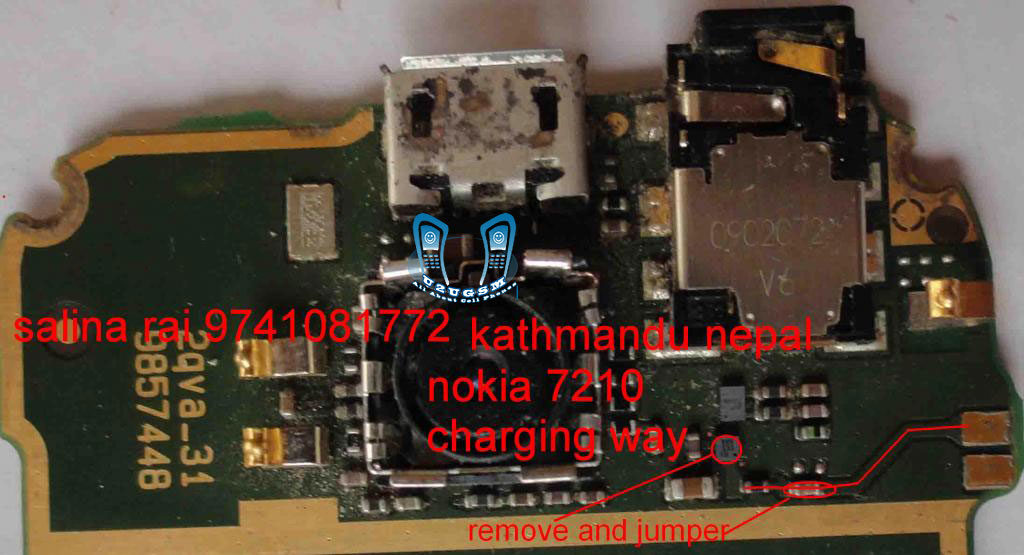
solution for no charging in nokia 7210supernova, Nokia 7210 charging not sopeted, 7210 charging solution, 7210 supernova charger not responding, nokia7210not charging solutions, N 7210 not charging problam, 7210 supernova charging solution, nokia 7210 charging way, nokia 7210c charging solution, nokia 7210 supernova charging soluson nokia 7210 not charging , nokia 7210 charging solution , nokia 7210 not charging solution , nokia 7210 supernova not charging solution , nokia 7210 supernova charging solution, 7210 not charging solution, Nokia7210charging, Nok 7210 Not charging, nokia 7210 speaker salutions,
Nokia Asha 200 insert sim solution 100 % tested solution nokia Asha 200 insert sim solution , nokia Asha 200 insert sim 1 solution , nokiaAsha 200insert sim solution ,, Asha 200 insert sim 2 solution , nokia Asha 200 sim 2 insert solution , nokiaAsha 200 insert sim solution , nokia Asha 200 insert sim 2 , nokia Asha 200 insert sim final solution, nokia Asha 200 sim 2 100 solution, insert sim nokia Asha 200 test 100, nokia Asha 200 insert sim 2 solution all links ok, Asha 200 insert sim 1, nokia Asha 200 insert sim 2 solution, nokia Asha 200 sim 2 insert sim, 100 sim solution, nokia Asha 200 insert sim2 100 tested solution, nokia Asha 200inset sim 100, nokia Asha 200 insert sim, u2u nokia 100 insart sim, U2U nokia 100 sim, nokia Asha 200 inser sim solution, nokia Asha 200insat sim priblam, nokia Asha 200 insat sim salution, nokia Asha 200 insert 1 and 2 solution
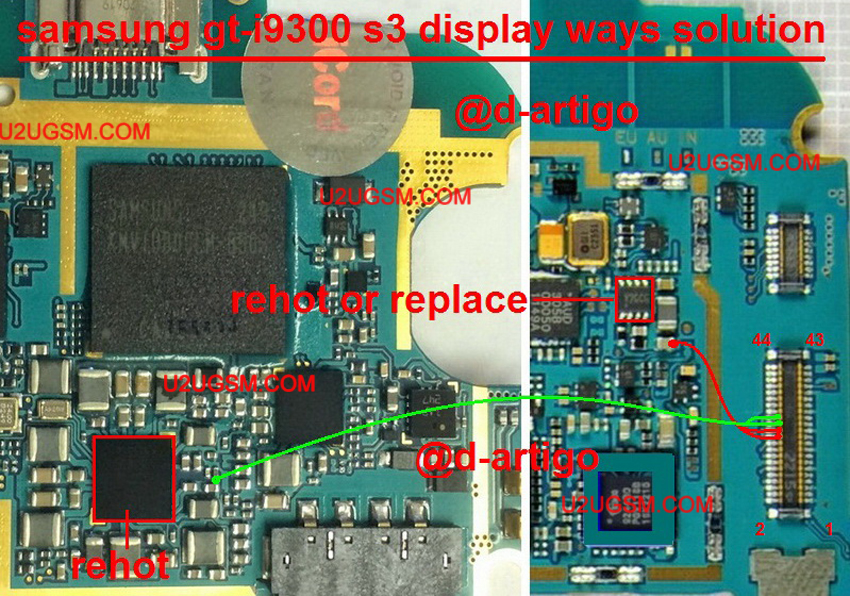
Samsung I9300 Galaxy S III LCD Display Light IC Solution Jumper Problem Waysif lcd light is not workin in Samsung I9300 Galaxy S III then we will not be able to watch any text on display.light can be dim or may be blank.Samsung I9300 Galaxy S III LCD Display Light IC Solution Jumper Problem Ways can be solve in a few steps as given in this post. after dis assambling Samsung I9300 Galaxy S III chek mother board if there is any carbon water damage or rust.clean whole board with electronics cleaner and then apply hot air for a few mints so that it can be dry.replae led if it is a jack lcd and if it is pasted then after removing check its prints value.if value is ok then replae lcd and if alue is missing then check whole parts componenets as iven in above diagram.check all paths and if any tracks of them is missing apply jumpers.it will help you to solve Samsung I9300 Galaxy S III LCD Display Light IC Solution Jumper Problem Wayseasly.For more information and new tips and tricks about this problem solution keep visiting this page we will update it if there will be new updates.some related post are also given below you can read more about mobile phone.Please note that although every diagram & solution posted on our website has been tested by one or more members of our team before posting,so we will not be responsible for any loss or damage, including personal injury.Use this repair solutions at your own risk. Samsung I9300 Galaxy S III,Nokia,LCD,Display,Solution,Jumper,Proble,WaysSamsung I9300 Galaxy S III LCD Display Light IC Solution Jumper Problem Ways LCD Display Light Not Working Samsung I9300 Galaxy S III,Nokia,LCD Display Light,Display Light Problem,Display Light Solution,Display Light Jumpers,Display Light Ways,White Display ,Blinking Display,Blank Display,Keypad Light
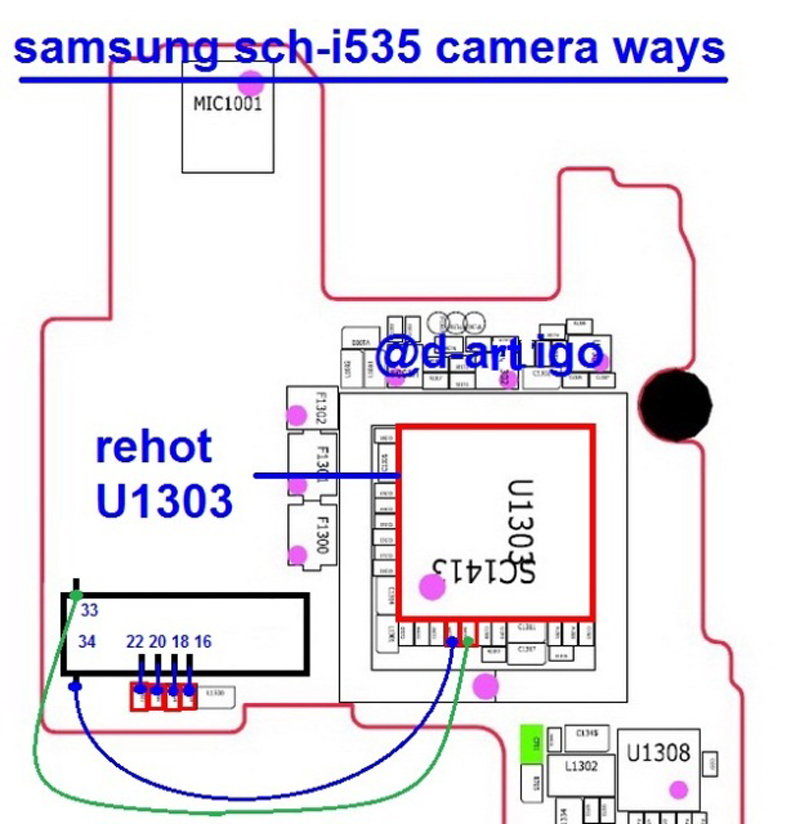
Samsung Galaxy S III Verizon sch-i535 Camera not Working Problem Solution Samsung Galaxy S III Verizon sch-i535 Camera not Working Problem Solution Samsung Galaxy S III Verizon sch-i535 cameratry to replace it with a new camerarehot camera ic LDO in U600 and U601if it is still as before .... check the voltage of his work in C609 and enable it in the R606 camera and his camera clock at Samsung Galaxy S III Verizon sch-i535 see the picture below only thank buttonSamsung Galaxy S III Verizon sch-i535 Camera not Working Problem SolutionI had a chance again to repair the Samsung Galaxy S III Verizon sch-i535 after swimming in sea water, after the general recovery remained faulty camera error "Unexpected error. Restart your phone " .By simple inspection, found that there is no supply voltage of 1.8 volts camera. Responsible for it marked on the stabilizer circuit phone Samsung S8500 as N1515 , unfortunately without any labeling. First I would like to power the camera from the voltage VIO is also 1.8 volts, the camera certainly earned after I gave food, but the phone went to reboot after a few seconds the camera.Replacement stabilizer N1515Find similar stabilizer of phones Nokia , which is on disassembly I could not, but found the stabilizer to the required settings in the phone Samsung D900 . Stabilizer from Samsung is marked R1114D181D-TR-F and position number U320 , where he also serves as a stabilizer on the camera. That's him, the camera on the phone began to work as expected, without any reboots. Stabilizer is made in a small package, place it on the board Nokia N8 was not difficult. Firstly removed the faulty N1515 and choke L1515 us as they are no longer needed, connect terminal B1 and B2 together and connected to the 6th conclusion (switching control), A2 is connected to the 1st conclusion (supply voltage Vbat ), to simplify layout and minimize wires mounted second conclusion is soldered to the body and the third output (output of 1.8 volts) on C1 . In general, a compact and properly. More clearly seen in the photo:
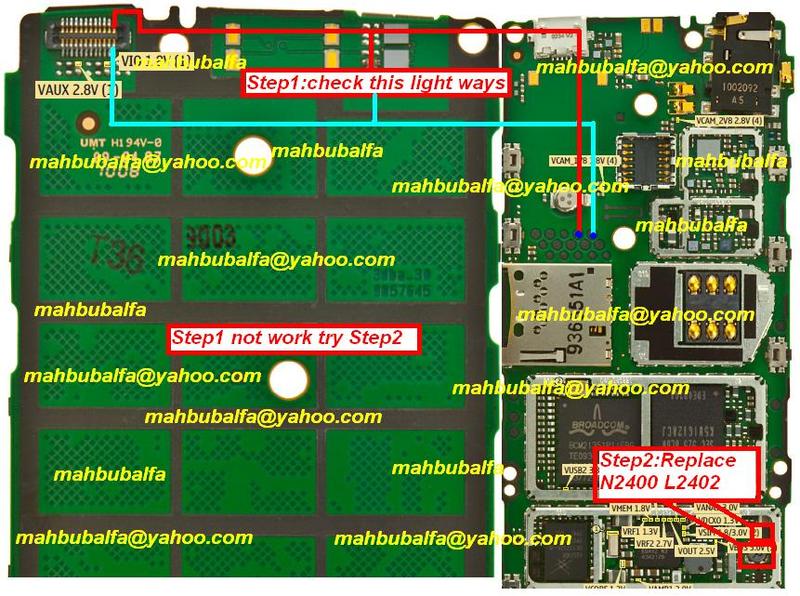
nokia x2-00 lcd light waysx2-00 lcd light waysx2-00 light waysnokia x2-00 light problem solutionnokia x2-00 light waysx2 00 light solutionnokia x2 00 light solutionx2-00 lcd light solutionnokia x2-00 display ic problemx2-00 light ic jumpernokia x2-00 display light jumper solution So check all these track and apply jumpers if any of these tracks is missing. Replace LCD and parts that are given in step two of the above diagram.
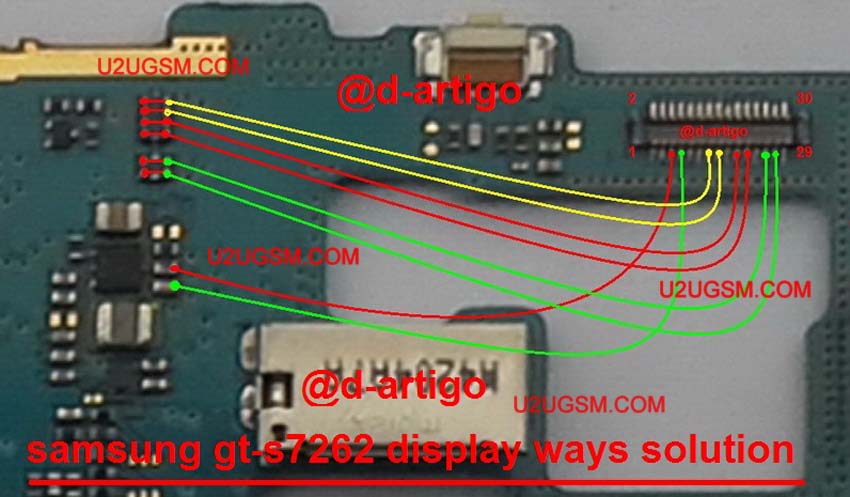
Samsung Galaxy Star Pro S7260 LCD Display IC Solution Jumper Problem Waysif you have LCD display problem in Samsung Galaxy Star Pro S7260 it will not show any thing on display screen.it can be blanck no light or dim display also.Samsung Galaxy Star Pro S7260 LCD Display IC Solution Jumper Problem Ways can be solve with a few steps that are given in this post.Look at diagram bellow and folw instructions. after dis assambling Mobile phone check whole board for rust carbon or water damages.clean lcd jack and mother board then apply hot air to dry it for a few mints.change lcd with new one if display is ok then fine else heck lcd jack prints value or remove it and replae with new.else try all paths tracks and components and parts that are given in diagram above if any path is missing aplly jumpers and if parts are damaged change them.For more information and new tips and tricks about this problem solution keep visiting this page we will update it if there will be new updates.some related post are also given below you can read more about mobile phone.Please note that although every diagram & solution posted on our website has been tested by one or more members of our team before posting,so we will not be responsible for any loss or damage, including personal injury.Use this repair solutions at your own risk. Samsung Galaxy Star Pro S7260,Nokia,LCD,Display,Solution,Jumper,Proble,WaysSamsung Galaxy Star Pro S7260 LCD Display IC Solution Jumper Problem Ways LCD Display Not Working Samsung Galaxy Star Pro S7260,Nokia,LCD Display,Display Problem,Display Solution,Display Jumpers,Display Ways,White Display ,Blinking Display,Blank Display
Samsung Grand Neo I9060 Mic Solution Jumper Problem Ways MicrophoneSamsung Grand Neo I9060 Mic problem can be solve in a few steps as given in this post.How we can find Mic fault into a cellphone is very easy way.when ever our voice can not reach to destination monbile phone or we can not recored our own voice in voice recorder of cell phone it means it Mic not working.If a Samsung Grand Neo I9060 Mic is not working then Mic problem can be solve in given bellow steps that are provided in diagram bellow. First step is open mobile and check Samsung Grand Neo I9060 Mic points on borad if there is a good value in it then change Mic with new one.Problem will be solve. if only mic points do not show value then chek all mic track and parts that are used in mic function in Samsung Grand Neo I9060.all mic parts and track are given in bellow diagram check all these parts and components and if necesory resold or change them.this will help you in Samsung Grand Neo I9060 Mic Solution Jumper Problem Ways MicrophoneFor more information and new tips and tricks about this problem solution keep visiting this page we will update it if there will be new updates.some related post are also given below you can read more about mobile phone.Please note that although every diagram & solution posted on our website has been tested by one or more members of our team before posting,so we will not be responsible for any loss or damage, including personal injury.Use this repair solutions at your own risk. Samsung Grand Neo I9060,Nokia,Mic,microphone,Solution,Jumper,Problem,WaysSamsung Grand Neo I9060 Mic Solution Jumper Problem Ways Mic Not Working MicrophoneSamsung Grand Neo I9060,Nokia,Mic,Microphone,Mic Problem,Mic Solution,Mic Jumpers,Mic Ways